Before creating a pull request from a fork, fork the upstream repository and push your changes to a branch in your fork. See Fork a repository.
In a pull request from a fork, the base branch is where you want to merge your changes, and the compare branch is the branch in your fork that contains your changes. See Creating a pull request.
Note
To open a pull request in a public repository, you must have write access to the head or the source branch or, for organization-owned repositories, you must be a member of the organization that owns the repository to open a pull request.
-
Navigate to the original repository where you created your fork.
-
Above the list of files, in the yellow banner, click Compare & pull request to create a pull request for the associated branch.

-
On the page to create a new pull request, click compare across forks.

-
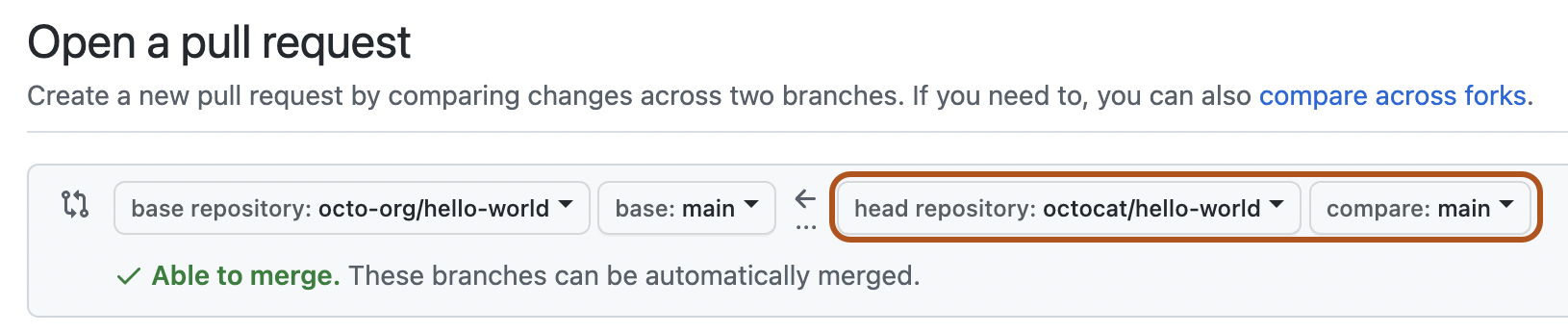
In the "base branch" dropdown menu, select the branch of the upstream repository where you want to merge changes.

-
In the "head fork" dropdown menu, select your fork. Then, use the "compare branch" dropdown menu to select the branch where you made your changes.
-
Type a title and description for your pull request.
-
On user-owned forks, if you want to allow anyone with push access to the upstream repository to make changes to your pull request, select Allow edits from maintainers.
Warning
If your fork contains GitHub Actions workflows, the option is Allow edits and access to secrets by maintainers. Allowing edits on a fork's branch that contains GitHub Actions workflows also allows a maintainer to edit the forked repository's workflows, which can potentially reveal values of secrets and grant access to other branches.
-
To create a pull request that is ready for review, click Create Pull Request. To create a draft pull request, use the drop-down and select Create Draft Pull Request, then click Draft Pull Request. If you are the member of an organization, you may need to request access to draft pull requests from an organization owner. See Pull requests.


Tip
After you create a pull request, you can ask a specific person to review your proposed changes. See Requesting a pull request review.