# Downloading files from GitHub
Learn how to download files from GitHub, and understand the difference between downloading, cloning, and forking.
## Introduction
GitHub.com is home to millions of open-source software projects, that you can copy, customize, and use for your own purposes.
There are different ways to get a copy of a repository's files on GitHub. You can:
* **Download** a snapshot of a repository's files as a zip file to your own (local) computer.
* **Clone** a repository to your local computer using Git.
* **Fork** a repository to create a new repository on GitHub.
Each of these methods has its own use case, which we'll explain in the next section.
This tutorial focuses on downloading a repository's files to your local computer. For example, if you've found some interesting content in a repository on GitHub, downloading is a simple way to get a copy of the content, without using Git or applying version control.
> \[!TIP]
> To download a release package or assets, such as the latest version of an application, or the installer, binary, or executable for software stored in a GitHub repository, see [Downloading source code archives from a release](/zh/repositories/working-with-files/using-files/downloading-source-code-archives#downloading-source-code-archives-from-a-release) or [Downloading source code archives from a tag](/zh/repositories/working-with-files/using-files/downloading-source-code-archives#downloading-source-code-archives-from-a-tag).
### Understanding the differences between downloading, cloning, and forking
| Term | Definition | Use case |
| -------- | ---------------------------------------------------------------------------------------------------------------------------------------------------------- | --------------------------------------------------------------------------------------------------------------------------------------------------------------------------------------------------------------------------------------------------------------------------------------------------------------------------------------------------------------------------------------------------------------------------------------------------- |
| Download | To save a snapshot of a repository's files to your local computer. | You want to use or customize the content of the files, but you're not interested in applying version control. |
| Clone | To make a full copy of a repository's data, including all versions of every file and folder. | You want to work on a full copy of the repository on your local computer, using Git to track and manage your changes. You likely intend to sync these locally-made changes with the GitHub-hosted repository. For more information, see [克隆仓库](/zh/repositories/creating-and-managing-repositories/cloning-a-repository). |
| Fork | To create a new repository on GitHub, linked to your personal account, that shares code and visibility settings with the original ("upstream") repository. | You want to use the original repository's data as a basis for your own project on GitHub. Or, you want to use the fork to propose changes to the original ("upstream") repository. After forking the repository, you still might want to clone the repository, so that you can work on the changes on your local computer. For more information, see [为存储库创建分支](/zh/pull-requests/collaborating-with-pull-requests/working-with-forks/fork-a-repo). |
## Downloading a repository's files
For the tutorial, we'll use a demo repository ([octocat/Spoon-Knife](https://github.com/octocat/Spoon-Knife)).
1. Navigate to [octocat/Spoon-Knife](https://github.com/octocat/Spoon-Knife).
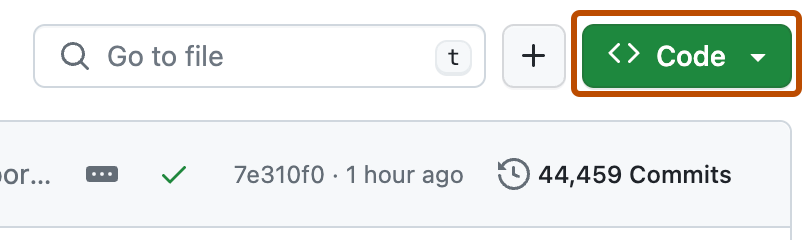
2. 在文件列表上方,单击“ Code”\*\*\*\*。
3. 单击“ Download ZIP”\*\*\*\*。
You now have a copy of the repository's files saved as a zip file on your local computer. You can edit and customize the files for your own purposes.
## Further reading
* [下载源代码存档](/zh/repositories/working-with-files/using-files/downloading-source-code-archives)