# Creating a pull request
Create a pull request to propose changes to the code in a repository.
If you want to create a new branch for your pull request but don't have write permissions to the repository, you can fork the repository first. See [Creating a pull request from a fork](/zh/pull-requests/how-tos/create-pull-requests/creating-a-pull-request-from-a-fork) and [Forks](/zh/pull-requests/reference/forks).
When you create your pull request, you can specify which branch you want to merge your changes into. Pull requests can only be opened between two different branches.
> \[!NOTE]
> 要在公共存储库中打开拉取请求,你必须具有对头分支或源分支写入权限;对于组织拥有的仓库,你必须是拥有该存储库的组织的成员才能打开拉取请求。
可以将拉取请求链接到问题,以显示修复正在进行,并在合并拉取请求时自动关闭问题。 有关详细信息,请参阅“[将拉取请求链接到议题](/zh/issues/tracking-your-work-with-issues/using-issues/linking-a-pull-request-to-an-issue)”。
## Creating the pull request
1. 在 GitHub 上,导航到存储库的主页面。
2. In the "Branch" menu, choose the branch that contains your commits.

3. 在文件列表上方的黄色横幅中,单击“比较和拉取请求”\*\*\*\*,为关联的分支创建拉取请求。

4. Use the *base* branch dropdown menu to select the branch where you want to merge your changes. Then, use the *compare* branch dropdown menu to choose the topic branch where you made your changes.
5. 为您的拉取请求输标题和说明。
6. 要创建可供审查的拉取请求,请单击“创建拉取请求”。
若要创建草稿拉取请求,请使用下拉列表并选择“创建草稿拉取请求”,然后单击“草稿拉取请求” 。 如果你是组织的成员,则可能需要从组织所有者请求对草稿拉取请求的访问权限。 请参阅“[Pull requests](/zh/pull-requests/collaborating-with-pull-requests/proposing-changes-to-your-work-with-pull-requests/about-pull-requests#draft-pull-requests)”。
> \[!TIP]
> 创建拉取请求后,你可请求特定人员[审查你提议的更改](/zh/pull-requests/collaborating-with-pull-requests/reviewing-changes-in-pull-requests/reviewing-proposed-changes-in-a-pull-request)。 有关详细信息,请参阅“[Requesting a pull request review](/zh/pull-requests/collaborating-with-pull-requests/proposing-changes-to-your-work-with-pull-requests/requesting-a-pull-request-review)”。
After your pull request has been reviewed, it can be merged into the repository. See [Merging a pull request](/zh/pull-requests/how-tos/merge-and-close-pull-requests/merging-a-pull-request).
> \[!NOTE]
> 若要详细了解 GitHub CLI,请参阅“[关于 GitHub CLI](/zh/github-cli/github-cli/about-github-cli)”。
To create a pull request, use the `gh pr create` subcommand.
```shell
gh pr create
```
To assign a pull request to an individual, use the `--assignee` or `-a` flags. You can use `@me` to self-assign the pull request.
```shell
gh pr create --assignee "@octocat"
```
To specify the branch into which you want the pull request merged, use the `--base` or `-B` flags. To specify the branch that contains commits for your pull request, use the `--head` or `-H` flags.
```shell
gh pr create --base my-base-branch --head my-changed-branch
```
To include a title and body for the new pull request, use the `--title` and `--body` flags.
```shell
gh pr create --title "The bug is fixed" --body "Everything works again"
```
To mark a pull request as a draft, use the `--draft` flag.
```shell
gh pr create --draft
```
To add labels or milestones to the new pull request, use the `--label` and `--milestone` flags.
```shell
gh pr create --label "bug,help wanted" --milestone octocat-milestone
```
To add the new pull request to a specific project, use the `--project` flag.
```shell
gh pr create --project octocat-project
```
To assign an individual or team as reviewers, use the `--reviewer` flag.
```shell
gh pr create --reviewer monalisa,hubot --reviewer myorg/team-name
```
To create the pull request in your default web browser, use the `--web` flag.
```shell
gh pr create --web
```
1. Click **Preview Pull Request**. GitHub Desktop opens a preview dialog that shows the diff of the changes between your current branch and the base branch.
Alternatively, to go straight to GitHub to create your pull request, select the dropdown icon and click **Create Pull Request**.
2. Confirm that the branch in the **base:** dropdown menu is the branch where you want to merge your changes.

GitHub Desktop tells you whether the current branch can be automatically merged into the base branch.

3. Click **Create Pull Request**. GitHub Desktop opens your default browser and takes you to GitHub.
4. 为您的拉取请求输标题和说明。
5. 要创建可供审查的拉取请求,请单击“创建拉取请求”。
若要创建草稿拉取请求,请使用下拉列表并选择“创建草稿拉取请求”,然后单击“草稿拉取请求” 。 如果你是组织的成员,则可能需要从组织所有者请求对草稿拉取请求的访问权限。 请参阅“[Pull requests](/zh/pull-requests/collaborating-with-pull-requests/proposing-changes-to-your-work-with-pull-requests/about-pull-requests#draft-pull-requests)”。
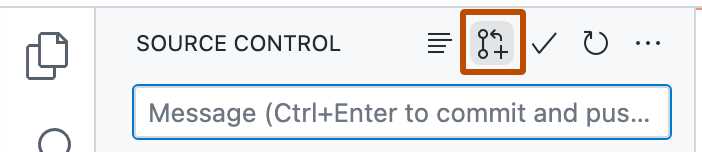
1. After you commit changes to your local copy of the repository, click the **Create Pull Request** icon.
2. Check that the local branch and repository you're merging from, and the remote branch and repository you're merging into, are correct. Then, give the pull request a title and a description.
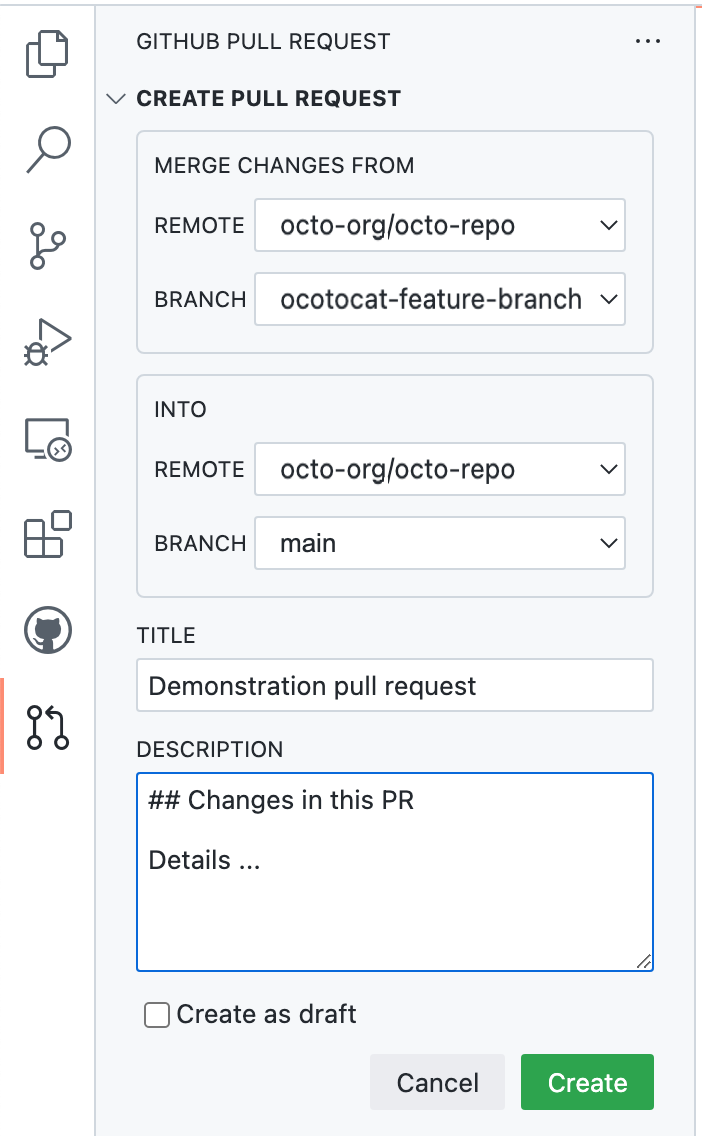
3. Click **Create**.
For more information on creating pull requests in GitHub Codespaces, see [将 GitHub Codespaces 用于拉取请求](/zh/codespaces/developing-in-a-codespace/using-github-codespaces-for-pull-requests).
## Making changes to files in your pull request
After you open your pull request, you can continue changing files by adding new commits to your head branch.
## Further reading
* [Creating a pull request from a fork](/zh/pull-requests/how-tos/create-pull-requests/creating-a-pull-request-from-a-fork)
* [Keeping your pull request in sync with the base branch](/zh/pull-requests/how-tos/create-pull-requests/keeping-your-pull-request-in-sync-with-the-base-branch)
* [Changing the base branch of a pull request](/zh/pull-requests/how-tos/create-pull-requests/changing-the-base-branch-of-a-pull-request)
* [创建议题](/zh/issues/tracking-your-work-with-issues/using-issues/creating-an-issue)
* [向其他GitHub用户分配问题和拉取请求](/zh/issues/tracking-your-work-with-issues/using-issues/assigning-issues-and-pull-requests-to-other-github-users)
* [在 GitHub 上写入](/zh/get-started/writing-on-github)